Chapter 2: Data Representation and Logic
To understand how computers work internally, we must understand the foundational concepts of boolean logic, number systems, and how characters are encoded into binary formats that a machine can process.
2.1 Boolean Logic
Boolean logic forms the basis of computer operations and digital circuits. It deals with variables that have two discrete values: True (1) and False (0).
Logic Gates
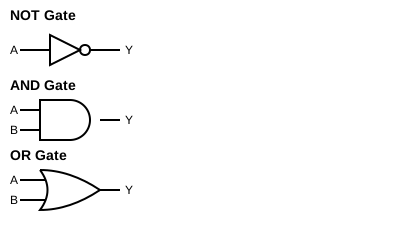
Logic gates are physical devices or conceptual constructs that perform basic boolean functions.
- NOT Gate: Reverses the input. If input is 1, output is 0. If input is 0, output is 1.
- AND Gate: Outputs 1 only if all inputs are 1. Otherwise, it outputs 0.
- OR Gate: Outputs 1 if at least one input is 1. Outputs 0 only if all inputs are 0.
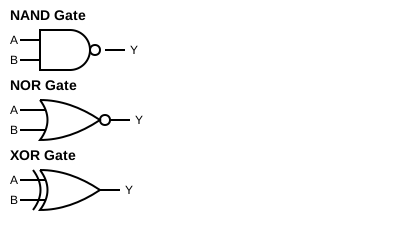
- NAND Gate: The inverse of AND. Outputs 0 only if all inputs are 1.
- NOR Gate: The inverse of OR. Outputs 1 only if all inputs are 0.
- XOR (Exclusive OR) Gate: Outputs 1 if the inputs are different (e.g., one is 1 and the other is 0).
Circuit Diagrams for Logic Gates:
Truth Tables
A truth table is a mathematical table used to determine if a logical expression is true for all input values.
Truth Table for AND Gate:
| Input A | Input B | A AND B |
|---|---|---|
| 0 | 0 | 0 |
| 0 | 1 | 0 |
| 1 | 0 | 0 |
| 1 | 1 | 1 |
Truth Table for OR Gate:
| Input A | Input B | A OR B |
|---|---|---|
| 0 | 0 | 0 |
| 0 | 1 | 1 |
| 1 | 0 | 1 |
| 1 | 1 | 1 |
Truth Table for NOT Gate:
| Input A | NOT A |
|---|---|
| 0 | 1 |
| 1 | 0 |
Truth Table for NAND Gate:
| Input A | Input B | A NAND B |
|---|---|---|
| 0 | 0 | 1 |
| 0 | 1 | 1 |
| 1 | 0 | 1 |
| 1 | 1 | 0 |
Truth Table for NOR Gate:
| Input A | Input B | A NOR B |
|---|---|---|
| 0 | 0 | 1 |
| 0 | 1 | 0 |
| 1 | 0 | 0 |
| 1 | 1 | 0 |
Truth Table for XOR Gate:
| Input A | Input B | A XOR B |
|---|---|---|
| 0 | 0 | 0 |
| 0 | 1 | 1 |
| 1 | 0 | 1 |
| 1 | 1 | 0 |
De Morgan’s Laws
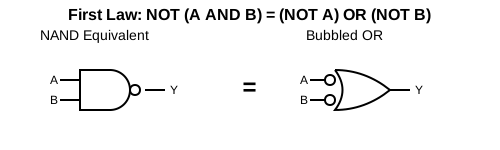
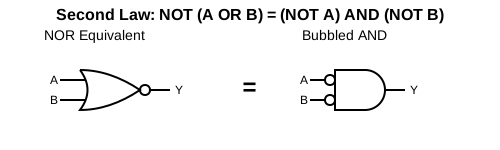
De Morgan’s laws provide a way to simplify logical expressions.
NOT (A AND B) = (NOT A) OR (NOT B)NOT (A OR B) = (NOT A) AND (NOT B)
Circuit Diagrams representing De Morgan’s Laws:
First Law: NOT (A AND B) = (NOT A) OR (NOT B)
Second Law: NOT (A OR B) = (NOT A) AND (NOT B)
Logic Circuits
By combining logic gates, we can build complex logic circuits that form the backbone of CPUs, performing calculations and executing decisions.
2.2 Number Systems
We use the decimal system daily, but computers use binary because of their electronic nature (on/off).
Common Number Systems
- Binary (Base 2): Uses two digits: 0, 1.
- Octal (Base 8): Uses eight digits: 0 to 7.
- Decimal (Base 10): Uses ten digits: 0 to 9.
- Hexadecimal (Base 16): Uses sixteen symbols: 0 to 9, and A to F (where A=10, B=11, C=12, D=13, E=14, F=15).
Conversion Between Number Systems
1. Decimal to Binary, Octal, and Hexadecimal To convert a decimal number to any other base, repeatedly divide the decimal number by the target base (2, 8, or 16) and note the remainders from bottom to top.
Example: Convert Decimal 13 to Binary, Octal, and Hexadecimal.
- To Binary (Base 2):
- 13 / 2 = 6, Remainder 1
- 6 / 2 = 3, Remainder 0
- 3 / 2 = 1, Remainder 1
- 1 / 2 = 0, Remainder 1
- Result: \(1101_2\)
- To Octal (Base 8):
- 13 / 8 = 1, Remainder 5
- 1 / 8 = 0, Remainder 1
- Result: \(15_8\)
- To Hexadecimal (Base 16):
- 13 / 16 = 0, Remainder 13 (which is ‘D’ in Hexadecimal)
- Result: \(D_{16}\)
2. Binary, Octal, and Hexadecimal to Decimal Multiply each digit by the base raised to the power of its position (starting from 0 on the right) and sum them up.
Example: Convert \(1101_2\), \(15_8\), and \(D_{16}\) back to Decimal.
- Binary \(1101_2\) to Decimal: \(1 \times 2^3 + 1 \times 2^2 + 0 \times 2^1 + 1 \times 2^0 = 8 + 4 + 0 + 1 = 13_{10}\)
- Octal \(15_8\) to Decimal: \(1 \times 8^1 + 5 \times 8^0 = 8 + 5 = 13_{10}\)
- Hexadecimal \(D_{16}\) to Decimal: \(13 \times 16^0 = 13_{10}\)
3. Binary to Octal and Hexadecimal
- Binary to Octal: Group the binary digits into sets of three, starting from the right. Pad with leading zeros if necessary. Convert each group to its decimal equivalent (0-7).
Example: Convert \(101011_2\) to Octal.
Groups:
101011-> Value:53-> \(53_8\) - Binary to Hexadecimal: Group the binary digits into sets of four, starting from the right. Pad with leading zeros if necessary. Convert each group to its hexadecimal equivalent (0-F).
Example: Convert \(101011_2\) to Hexadecimal.
Groups:
00101011-> Value:2B-> \(2B_{16}\)
4. Octal and Hexadecimal to Binary
- Octal to Binary: Convert each octal digit into a 3-bit binary group.
Example: Convert \(53_8\) to Binary.
Digit
5->101, Digit3->011-> Result: \(101011_2\) - Hexadecimal to Binary: Convert each hex digit into a 4-bit binary group.
Example: Convert \(2B_{16}\) to Binary.
Digit
2->0010, DigitB(11) ->1011-> Result: \(00101011_2\) or \(101011_2\)
5. Indirect Conversions: Octal to Hexadecimal and Vice Versa Conversions between Octal and Hexadecimal are typically performed indirectly by using either Binary or Decimal as an intermediate base.
Method A: Via Binary (Most Common & Recommended)
- Octal to Hexadecimal: Octal \(53_8\) -> Binary \(101011_2\) -> Hexadecimal \(2B_{16}\)
- Hexadecimal to Octal: Hexadecimal \(2B_{16}\) -> Binary \(00101011_2\) -> Octal \(53_8\)
Method B: Via Decimal (Alternative)
- Octal to Hexadecimal: Octal \(53_8\) -> Decimal \(43_{10}\) -> Hexadecimal \(2B_{16}\)
- Hexadecimal to Octal: Hexadecimal \(2B_{16}\) -> Decimal \(43_{10}\) -> Octal \(53_8\)
2.3 Encoding Schemes
Computers store everything, including text, as numbers. Encoding schemes dictate how characters are mapped to binary numbers.
- ASCII (American Standard Code for Information Interchange): Originally a 7-bit code (later 8-bit) representing 128 (or 256) characters. E.g., ‘A’ is 65.
- ISCII (Indian Script Code for Information Interchange): An 8-bit encoding scheme to represent Indian scripts (Devanagari, Bengali, etc.).
- Unicode: A universal character encoding standard capable of representing all characters from all languages in the world.
- UTF-8: Variable-width encoding using 1 to 4 bytes per character. Highly compatible with ASCII.
- UTF-32: Fixed-width encoding using 4 bytes (32 bits) for every character.
Competency Based Questions
Q1. Predict the Output
Evaluate the Boolean expression (A OR B) AND (NOT C) for the following input values:
A = 0, B = 1, C = 1.
Q2. Application-Oriented A web developer needs to create a webpage that can display English, Hindi, and Japanese text on the same page. Which encoding scheme should the developer choose and why?
Q3. Assertion-Reasoning
- Assertion (A): The hexadecimal number system uses letters A-F to represent values from 10 to 15.
- Reason (R): Base 16 requires 16 unique symbols, and the digits 0-9 only provide 10 symbols, so alphabet letters are borrowed for the remaining values. Choose the correct option: a) Both A and R are true and R is the correct explanation of A. b) Both A and R are true but R is NOT the correct explanation of A. c) A is true but R is false. d) A is false but R is true.
Q4. Conversion Case Study A sensor is outputting data in binary format. A reading from the sensor is \(11010_2\).
- Convert this reading to its Decimal equivalent so the engineer can understand it.
- Convert the resulting Decimal number to Hexadecimal.
Answers to Competency Based Questions
A1.
Given A = 0, B = 1, C = 1.
Expression: (0 OR 1) AND (NOT 1)
Step 1: (0 OR 1) is 1.
Step 2: (NOT 1) is 0.
Step 3: 1 AND 0 is 0.
Result: 0 (False).
A2. The developer should choose Unicode (specifically UTF-8). Reason: ASCII and ISCII are limited to specific character sets. Unicode is a universal standard designed to represent characters from nearly all written languages around the world, making it ideal for multilingual web pages.
A3. a) Both A and R are true and R is the correct explanation of A. Hexadecimal is base 16, so it naturally needs 16 single-character symbols.
A4.
- Convert \(11010_2\) to Decimal: \(= (1 \times 2^4) + (1 \times 2^3) + (0 \times 2^2) + (1 \times 2^1) + (0 \times 2^0)\) \(= 16 + 8 + 0 + 2 + 0\) \(= 26\) The decimal equivalent is 26.
- Convert 26 to Hexadecimal: \(26 \div 16 = 1\) with a remainder of \(10\). In Hex, 10 is ‘A’. The hexadecimal equivalent is 1A.