Copyright and License
© 2026 Abhishek Kumar. All rights reserved.
Website: https://abhishek-kumar.co.in
Email: support@abhishek-kumar.co.in
No part of this publication may be reproduced, distributed, or transmitted in any form or by any means, including photocopying, recording, or other electronic or mechanical methods, without the prior written permission of the publisher, except in the case of brief quotations embodied in critical reviews and certain other noncommercial uses permitted by copyright law.
Chapter 1: Computer Systems Overview
Welcome to the exciting world of Computer Science! This chapter lays the foundation by introducing you to the fundamental components of a computer system.
1.1 Basic Computer Organisation
A Computer System is an electronic device that can be programmed to accept data (input), process it, and generate meaningful information (output). A computer primarily consists of hardware and software.
Hardware vs Software
- Hardware: The physical, tangible components of the computer (e.g., keyboard, monitor, CPU).
- Software: The set of instructions or programs that tell the hardware what to do.
Components of a Computer System
- Input Devices: Devices used to provide data and instructions to the computer. Examples include Keyboard, Mouse, Scanner, Microphone, and Barcode Reader.
- Output Devices: Devices used to display or provide the result of processing. Examples include Monitor, Printer, Speaker, and Projector.
- Central Processing Unit (CPU): Known as the “brain” of the computer, the CPU executes instructions. It consists of the Arithmetic Logic Unit (ALU) for calculations, and the Control Unit (CU) to manage operations.
- Memory: Used to store data and instructions.
- Primary Memory: Volatile memory (like RAM) directly accessible by the CPU, used for active tasks. Also includes ROM (Read Only Memory).
- Cache Memory: Extremely fast, small memory located near or inside the CPU that stores frequently used data to speed up processing.
- Secondary Memory: Non-volatile storage for long-term data retention (e.g., Hard Disk Drives, Solid State Drives, Pen Drives, CDs).
Units of Memory
Computer memory is measured in specific units based on binary digits (0s and 1s):
- Bit: A single binary digit (0 or 1).
- Byte: 8 Bits.
- Kilobyte (KB): 1024 Bytes.
- Megabyte (MB): 1024 KB.
- Gigabyte (GB): 1024 MB.
- Terabyte (TB): 1024 GB.
- Petabyte (PB): 1024 TB.
1.2 Types of Software
Software is broadly categorized based on its function.
1. System Software
Software that provides a platform and manages computer hardware so that other software can run.
- Operating Systems (OS): The core software that manages hardware resources (e.g., Windows, macOS, Linux, Android).
- System Utilities: Tools used for system maintenance, like disk formatting tools, antivirus programs, and file managers.
- Device Drivers: Specialized software that allows the OS to communicate with specific hardware devices (e.g., a printer driver).
2. Programming Tools and Language Translators
These are used by developers to write and translate code into machine language.
- Assembler: Translates assembly language into machine code.
- Compiler: Translates the entire high-level language program into machine code in one go.
- Interpreter: Translates high-level language programs line-by-line during execution.
3. Application Software
Software designed to perform specific tasks for the user (e.g., Word processors, Web browsers, Video games).
1.3 Operating System (OS)
An Operating System acts as an intermediary between the user and the computer hardware.
Functions of an Operating System
- Process Management: Allocating CPU time to different running programs.
- Memory Management: Keeping track of primary memory and allocating/deallocating it as needed.
- File Management: Organizing data into files and directories on storage devices.
- Device Management: Managing communication with external devices via drivers.
- Security: Protecting data and resources through passwords and access controls.
OS User Interface
The UI is how a user interacts with the OS:
- Command Line Interface (CLI): Users type text commands (e.g., DOS, Linux Terminal). It is lightweight but requires memorizing commands.
- Graphical User Interface (GUI): Users interact with graphical elements like windows, icons, and menus using a mouse (e.g., Windows, macOS). It is highly user-friendly.
Competency Based Questions
Q1. Case-Based Scenario Ravi just bought a new computer. He wants to install a program that will allow him to type letters and create documents for his business.
- What type of software does Ravi need to install for typing documents?
- Mention the category of software that the Operating System falls under.
Q2. Assertion-Reasoning
- Assertion (A): Cache memory is faster than Primary memory but slower than CPU registers.
- Reason (R): Cache memory acts as a buffer between the CPU and the Main Memory to speed up processing. Choose the correct option: a) Both A and R are true and R is the correct explanation of A. b) Both A and R are true but R is NOT the correct explanation of A. c) A is true but R is false. d) A is false but R is true.
Q3. Application-Oriented A school needs to store the academic records of 5000 students. The principal wants to ensure the data is not lost when the computer is turned off. Which type of memory should the school rely on to store this data permanently? Justify your answer.
Q4. Find the Error Consider the following statements regarding Language Translators. Identify the incorrect statement and correct it.
- An Assembler converts High-Level Language to Machine Code.
- An Interpreter translates code line by line.
- A Compiler translates the entire program at once.
Answers to Competency Based Questions
A1.
- Ravi needs to install Application Software (specifically, Word Processing software).
- The Operating System falls under System Software.
A2. a) Both A and R are true and R is the correct explanation of A. Cache is placed between the CPU and RAM specifically to provide high-speed data access.
A3. The school should rely on Secondary Memory (such as a Hard Disk Drive or Solid State Drive). Justification: Primary memory (RAM) is volatile, meaning data is lost when the power is turned off. Secondary memory is non-volatile and is designed for long-term permanent storage of data.
A4. The incorrect statement is: “1. An Assembler converts High-Level Language to Machine Code.” Correction: An Assembler converts Assembly Language to Machine Code. High-Level Language to Machine Code conversion is done by a Compiler or an Interpreter.
Chapter 2: Data Representation and Logic
To understand how computers work internally, we must understand the foundational concepts of boolean logic, number systems, and how characters are encoded into binary formats that a machine can process.
2.1 Boolean Logic
Boolean logic forms the basis of computer operations and digital circuits. It deals with variables that have two discrete values: True (1) and False (0).
Logic Gates
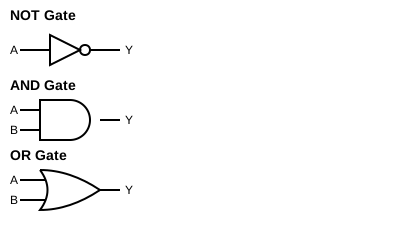
Logic gates are physical devices or conceptual constructs that perform basic boolean functions.
- NOT Gate: Reverses the input. If input is 1, output is 0. If input is 0, output is 1.
- AND Gate: Outputs 1 only if all inputs are 1. Otherwise, it outputs 0.
- OR Gate: Outputs 1 if at least one input is 1. Outputs 0 only if all inputs are 0.
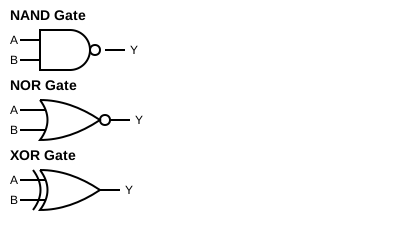
- NAND Gate: The inverse of AND. Outputs 0 only if all inputs are 1.
- NOR Gate: The inverse of OR. Outputs 1 only if all inputs are 0.
- XOR (Exclusive OR) Gate: Outputs 1 if the inputs are different (e.g., one is 1 and the other is 0).
Circuit Diagrams for Logic Gates:
Truth Tables
A truth table is a mathematical table used to determine if a logical expression is true for all input values.
Truth Table for AND Gate:
| Input A | Input B | A AND B |
|---|---|---|
| 0 | 0 | 0 |
| 0 | 1 | 0 |
| 1 | 0 | 0 |
| 1 | 1 | 1 |
Truth Table for OR Gate:
| Input A | Input B | A OR B |
|---|---|---|
| 0 | 0 | 0 |
| 0 | 1 | 1 |
| 1 | 0 | 1 |
| 1 | 1 | 1 |
Truth Table for NOT Gate:
| Input A | NOT A |
|---|---|
| 0 | 1 |
| 1 | 0 |
Truth Table for NAND Gate:
| Input A | Input B | A NAND B |
|---|---|---|
| 0 | 0 | 1 |
| 0 | 1 | 1 |
| 1 | 0 | 1 |
| 1 | 1 | 0 |
Truth Table for NOR Gate:
| Input A | Input B | A NOR B |
|---|---|---|
| 0 | 0 | 1 |
| 0 | 1 | 0 |
| 1 | 0 | 0 |
| 1 | 1 | 0 |
Truth Table for XOR Gate:
| Input A | Input B | A XOR B |
|---|---|---|
| 0 | 0 | 0 |
| 0 | 1 | 1 |
| 1 | 0 | 1 |
| 1 | 1 | 0 |
De Morgan’s Laws
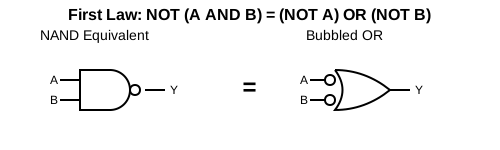
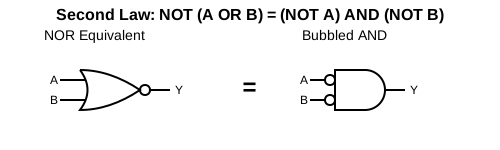
De Morgan’s laws provide a way to simplify logical expressions.
NOT (A AND B) = (NOT A) OR (NOT B)NOT (A OR B) = (NOT A) AND (NOT B)
Circuit Diagrams representing De Morgan’s Laws:
First Law: NOT (A AND B) = (NOT A) OR (NOT B)
Second Law: NOT (A OR B) = (NOT A) AND (NOT B)
Logic Circuits
By combining logic gates, we can build complex logic circuits that form the backbone of CPUs, performing calculations and executing decisions.
2.2 Number Systems
We use the decimal system daily, but computers use binary because of their electronic nature (on/off).
Common Number Systems
- Binary (Base 2): Uses two digits: 0, 1.
- Octal (Base 8): Uses eight digits: 0 to 7.
- Decimal (Base 10): Uses ten digits: 0 to 9.
- Hexadecimal (Base 16): Uses sixteen symbols: 0 to 9, and A to F (where A=10, B=11, C=12, D=13, E=14, F=15).
Conversion Between Number Systems
1. Decimal to Binary, Octal, and Hexadecimal To convert a decimal number to any other base, repeatedly divide the decimal number by the target base (2, 8, or 16) and note the remainders from bottom to top.
Example: Convert Decimal 13 to Binary, Octal, and Hexadecimal.
- To Binary (Base 2):
- 13 / 2 = 6, Remainder 1
- 6 / 2 = 3, Remainder 0
- 3 / 2 = 1, Remainder 1
- 1 / 2 = 0, Remainder 1
- Result: \(1101_2\)
- To Octal (Base 8):
- 13 / 8 = 1, Remainder 5
- 1 / 8 = 0, Remainder 1
- Result: \(15_8\)
- To Hexadecimal (Base 16):
- 13 / 16 = 0, Remainder 13 (which is ‘D’ in Hexadecimal)
- Result: \(D_{16}\)
2. Binary, Octal, and Hexadecimal to Decimal Multiply each digit by the base raised to the power of its position (starting from 0 on the right) and sum them up.
Example: Convert \(1101_2\), \(15_8\), and \(D_{16}\) back to Decimal.
- Binary \(1101_2\) to Decimal: \(1 \times 2^3 + 1 \times 2^2 + 0 \times 2^1 + 1 \times 2^0 = 8 + 4 + 0 + 1 = 13_{10}\)
- Octal \(15_8\) to Decimal: \(1 \times 8^1 + 5 \times 8^0 = 8 + 5 = 13_{10}\)
- Hexadecimal \(D_{16}\) to Decimal: \(13 \times 16^0 = 13_{10}\)
3. Binary to Octal and Hexadecimal
- Binary to Octal: Group the binary digits into sets of three, starting from the right. Pad with leading zeros if necessary. Convert each group to its decimal equivalent (0-7).
Example: Convert \(101011_2\) to Octal.
Groups:
101011-> Value:53-> \(53_8\) - Binary to Hexadecimal: Group the binary digits into sets of four, starting from the right. Pad with leading zeros if necessary. Convert each group to its hexadecimal equivalent (0-F).
Example: Convert \(101011_2\) to Hexadecimal.
Groups:
00101011-> Value:2B-> \(2B_{16}\)
4. Octal and Hexadecimal to Binary
- Octal to Binary: Convert each octal digit into a 3-bit binary group.
Example: Convert \(53_8\) to Binary.
Digit
5->101, Digit3->011-> Result: \(101011_2\) - Hexadecimal to Binary: Convert each hex digit into a 4-bit binary group.
Example: Convert \(2B_{16}\) to Binary.
Digit
2->0010, DigitB(11) ->1011-> Result: \(00101011_2\) or \(101011_2\)
5. Indirect Conversions: Octal to Hexadecimal and Vice Versa Conversions between Octal and Hexadecimal are typically performed indirectly by using either Binary or Decimal as an intermediate base.
Method A: Via Binary (Most Common & Recommended)
- Octal to Hexadecimal: Octal \(53_8\) -> Binary \(101011_2\) -> Hexadecimal \(2B_{16}\)
- Hexadecimal to Octal: Hexadecimal \(2B_{16}\) -> Binary \(00101011_2\) -> Octal \(53_8\)
Method B: Via Decimal (Alternative)
- Octal to Hexadecimal: Octal \(53_8\) -> Decimal \(43_{10}\) -> Hexadecimal \(2B_{16}\)
- Hexadecimal to Octal: Hexadecimal \(2B_{16}\) -> Decimal \(43_{10}\) -> Octal \(53_8\)
2.3 Encoding Schemes
Computers store everything, including text, as numbers. Encoding schemes dictate how characters are mapped to binary numbers.
- ASCII (American Standard Code for Information Interchange): Originally a 7-bit code (later 8-bit) representing 128 (or 256) characters. E.g., ‘A’ is 65.
- ISCII (Indian Script Code for Information Interchange): An 8-bit encoding scheme to represent Indian scripts (Devanagari, Bengali, etc.).
- Unicode: A universal character encoding standard capable of representing all characters from all languages in the world.
- UTF-8: Variable-width encoding using 1 to 4 bytes per character. Highly compatible with ASCII.
- UTF-32: Fixed-width encoding using 4 bytes (32 bits) for every character.
Competency Based Questions
Q1. Predict the Output
Evaluate the Boolean expression (A OR B) AND (NOT C) for the following input values:
A = 0, B = 1, C = 1.
Q2. Application-Oriented A web developer needs to create a webpage that can display English, Hindi, and Japanese text on the same page. Which encoding scheme should the developer choose and why?
Q3. Assertion-Reasoning
- Assertion (A): The hexadecimal number system uses letters A-F to represent values from 10 to 15.
- Reason (R): Base 16 requires 16 unique symbols, and the digits 0-9 only provide 10 symbols, so alphabet letters are borrowed for the remaining values. Choose the correct option: a) Both A and R are true and R is the correct explanation of A. b) Both A and R are true but R is NOT the correct explanation of A. c) A is true but R is false. d) A is false but R is true.
Q4. Conversion Case Study A sensor is outputting data in binary format. A reading from the sensor is \(11010_2\).
- Convert this reading to its Decimal equivalent so the engineer can understand it.
- Convert the resulting Decimal number to Hexadecimal.
Answers to Competency Based Questions
A1.
Given A = 0, B = 1, C = 1.
Expression: (0 OR 1) AND (NOT 1)
Step 1: (0 OR 1) is 1.
Step 2: (NOT 1) is 0.
Step 3: 1 AND 0 is 0.
Result: 0 (False).
A2. The developer should choose Unicode (specifically UTF-8). Reason: ASCII and ISCII are limited to specific character sets. Unicode is a universal standard designed to represent characters from nearly all written languages around the world, making it ideal for multilingual web pages.
A3. a) Both A and R are true and R is the correct explanation of A. Hexadecimal is base 16, so it naturally needs 16 single-character symbols.
A4.
- Convert \(11010_2\) to Decimal: \(= (1 \times 2^4) + (1 \times 2^3) + (0 \times 2^2) + (1 \times 2^1) + (0 \times 2^0)\) \(= 16 + 8 + 0 + 2 + 0\) \(= 26\) The decimal equivalent is 26.
- Convert 26 to Hexadecimal: \(26 \div 16 = 1\) with a remainder of \(10\). In Hex, 10 is ‘A’. The hexadecimal equivalent is 1A.
Chapter 3: Introduction to Problem-Solving
Before diving into writing code, it is essential to understand the systematic approach to solving problems using computers. Programming is not just about typing syntax; it’s about logic and structured thinking.
3.1 Steps for Problem-Solving
Solving a problem using a computer involves a life cycle consisting of several distinct stages:
- Analyzing the Problem: Understanding the core issue, identifying what the inputs are, what output is expected, and what constraints exist.
- Developing an Algorithm: Creating a step-by-step logical sequence of instructions to solve the problem.
- Coding: Translating the algorithm into a specific programming language (like Python) that the computer can execute.
- Testing: Running the program with various sets of test data (including edge cases) to ensure it produces the correct output.
- Debugging: The process of finding and fixing errors (bugs) in the code that are discovered during testing.
3.2 Representation of Algorithms
Algorithms can be represented visually or textually to make them easier to understand and communicate.
Pseudocode
Pseudocode is an informal, plain English description of the steps of an algorithm. It does not use strict programming syntax. Example Pseudocode to find the sum of two numbers:
Step 1: Input first number as A
Step 2: Input second number as B
Step 3: Calculate SUM = A + B
Step 4: Print SUM
Flowcharts
A flowchart is a graphical representation of an algorithm using standard geometric shapes connected by arrows.
- Oval: Start/Stop
- Parallelogram: Input/Output
- Rectangle: Processing/Calculation
- Diamond: Decision/Condition
- Arrows: Flow of control
3.3 Decomposition
Decomposition (also known as factoring) is the process of breaking down a complex problem or system into smaller, more manageable parts. By solving these smaller sub-problems individually and then combining their solutions, we can solve the original complex problem much more easily.
Example: Building a calculator application. Instead of trying to write the entire application at once, decompose it into:
- Building the User Interface.
- Writing the logic for Addition.
- Writing the logic for Subtraction.
- Writing the logic for Multiplication/Division.
Competency Based Questions
Q1. Case-Based Scenario Meera is tasked with creating a program that calculates the compound interest for a bank. She immediately opened her laptop and started typing Python code, but she soon got confused and her program gave incorrect results.
- Which crucial problem-solving step did Meera skip?
- What should she have done before starting to code?
Q2. Find the Error Consider the following pseudocode meant to check if a person is eligible to vote:
Step 1: Input Age
Step 2: If Age < 18, Print "Eligible to vote"
Step 3: Else, Print "Not eligible to vote"
Identify the logical error in the pseudocode and provide the corrected version.
Q3. Application-Oriented Draw a flowchart (or describe the shapes and flow) to input a number and check whether it is even or odd.
Q4. Assertion-Reasoning
- Assertion (A): Debugging is done before the coding phase in the problem-solving cycle.
- Reason (R): Debugging is the process of finding and fixing errors in the written code. Choose the correct option: a) Both A and R are true and R is the correct explanation of A. b) Both A and R are true but R is NOT the correct explanation of A. c) A is true but R is false. d) A is false but R is true.
Answers to Competency Based Questions
A1.
- Meera skipped the Analyzing the Problem and Developing an Algorithm steps.
- She should have first understood the formula for compound interest, determined her inputs, and written an algorithm or flowchart to structure her logic before writing any code.
A2.
Error: The condition Age < 18 is mapped to “Eligible to vote”, which is logically backward.
Corrected Pseudocode:
Step 1: Input Age
Step 2: If Age >= 18, Print "Eligible to vote"
Step 3: Else, Print "Not eligible to vote"
A3. Flowchart Description:
- Oval: START
- Parallelogram: INPUT Number (N)
- Rectangle: Calculate Remainder R = N % 2
- Diamond: Is R == 0?
- If YES (True arrow) -> Parallelogram: PRINT “Even”
- If NO (False arrow) -> Parallelogram: PRINT “Odd”
- Oval: STOP (Both True and False paths merge here).
A4. d) A is false but R is true. Debugging is done after or during the coding and testing phases, not before it, because you cannot debug code that hasn’t been written yet.
Chapter 4: Getting Started with Python
Python is a high-level, interpreted, and general-purpose programming language. Created by Guido van Rossum, it is renowned for its readability and simplicity.
4.1 Familiarization with Basics
Python is easy to learn and supports both procedural and object-oriented programming paradigms.
Execution Modes
- Interactive Mode: Commands are typed directly into the Python prompt (
>>>) and executed immediately. Good for testing small snippets. - Script Mode: Python code is saved in a file with a
.pyextension and executed as a whole. Good for writing complete programs.
Simple Program:
print("Hello World!")
4.2 Tokens and Variables
A Token is the smallest individual unit in a Python program.
- Keywords: Reserved words with special meaning (e.g.,
if,for,def). - Identifiers: Names given to variables, functions, etc. Must start with a letter or underscore, and cannot be a keyword.
- Literals: Data items that have a fixed value (e.g.,
42,"Hello"). - Operators: Symbols that perform operations on operands (e.g.,
+,-). - Punctuators: Symbols used to organize sentence structures in programming (e.g.,
,,:,()).
Variables, l-value, and r-value
A variable is a named memory location used to store data.
age = 16 # 'age' is the l-value, 16 is the r-value
- l-value: An expression that can appear on the left side of an assignment (e.g., a variable name).
- r-value: An expression that provides a value to be assigned (e.g., a literal or calculation).
Comments: Used to explain code. Python uses # for single-line comments.
4.3 Data Types
Data types define the type of data a variable can hold.
- Number:
int(integers),float(decimals),complex(real + imaginary). - Boolean:
bool(TrueorFalse). - Sequence:
str(String),list(mutable sequence),tuple(immutable sequence). - Mapping:
dict(Dictionary - key/value pairs). - None: Represents the absence of a value.
Mutable vs Immutable:
- Mutable: Values can be changed in place (e.g.,
list,dict). - Immutable: Values cannot be changed once created (e.g.,
int,float,str,tuple).
4.4 Operators
- Arithmetic:
+,-,*,/,//(floor division),%(modulus),**(exponentiation). - Relational:
<,>,<=,>=,==,!=. - Logical:
and,or,not. - Assignment:
=,+=,-=, etc. - Identity:
is,is not(checks memory location). - Membership:
in,not in(checks if an item exists in a sequence).
4.5 Expressions, Type Conversion, and I/O
- Expressions: A combination of operators and operands. Precedence rules (BODMAS/PEMDAS) apply.
- Type Conversion:
- Implicit: Python automatically converts types (e.g.,
int+float=float). - Explicit (Type Casting): Programmer forces conversion using functions like
int(),float().
- Implicit: Python automatically converts types (e.g.,
- Input/Output:
input()function reads input from the user as a string.print()function displays output to the console.
4.6 Errors
- Syntax Errors: Grammatical rules of Python are violated (e.g., missing a colon). The program won’t run.
- Logical Errors: The program runs but produces the wrong output due to flawed logic (e.g., using
+instead of-). - Run-time Errors: The program crashes during execution due to illegal operations (e.g., dividing by zero).
Competency Based Questions
Q1. Predict the Output What will be the output of the following Python code snippet?
x = 10
y = 3
print(x // y)
print(x % y)
Q2. Case-Based Scenario Rahul wrote the following code to calculate the area of a rectangle:
length = input("Enter length: ")
breadth = input("Enter breadth: ")
area = length * breadth
print("Area is", area)
When he runs the code and inputs 5 and 4, the program crashes with an error.
- Identify the type of error (Syntax, Logical, or Run-time).
- Explain why the error occurred and correct the code.
Q3. Assertion-Reasoning
- Assertion (A): Strings and Tuples are immutable data types in Python.
- Reason (R): Elements of an immutable data type cannot be altered or modified in-place after they are created. Choose the correct option: a) Both A and R are true and R is the correct explanation of A. b) Both A and R are true but R is NOT the correct explanation of A. c) A is true but R is false. d) A is false but R is true.
Q4. Application-Oriented
Write a Python expression to check if a variable char is a vowel (i.e., ‘a’, ‘e’, ‘i’, ‘o’, ‘u’). Use the membership operator.
Answers to Competency Based Questions
A1. Output:
3
1
Explanation: // is floor division (\(10 \div 3 = 3\) remainder 1). % is the modulus operator, which returns the remainder (\(1\)).
A2.
- It is a Run-time error (specifically a
TypeError). - Explanation: The
input()function always returns data as a string. You cannot multiply two strings together ("5" * "4"is invalid). Rahul needs to use explicit type conversion. Corrected Code:
length = int(input("Enter length: "))
breadth = int(input("Enter breadth: "))
area = length * breadth
print("Area is", area)
A3. a) Both A and R are true and R is the correct explanation of A. By definition, immutable objects cannot be modified after creation.
A4.
char in 'aeiouAEIOU'
(Alternatively, checking against a list: char.lower() in ['a', 'e', 'i', 'o', 'u'])
Chapter 5: Flow of Control
Usually, a Python program executes instructions sequentially from top to bottom. However, sometimes we need to skip instructions, choose between alternative paths, or repeat a block of code multiple times. This is managed by control flow statements.
Python relies heavily on indentation (whitespace at the beginning of a line) to define blocks of code.
5.1 Conditional Statements
Conditional statements allow a program to make decisions based on whether a condition evaluates to True or False.
The if Statement
Executes a block of code only if the condition is True.
x = 10
if x > 0:
    print("x is positive")
The if-else Statement
Provides an alternative path if the condition is False.
x = -5
if x >= 0:
    print("Positive or Zero")
else:
    print("Negative")
The if-elif-else Statement
Used to check multiple conditions sequentially. elif stands for “else if”.
marks = 85
if marks >= 90:
    print("Grade A")
elif marks >= 80:
    print("Grade B")
else:
    print("Grade C or below")
Example Program: Absolute Value
n = int(input("Enter a number: "))
if n < 0:
    n = n * -1
print("Absolute value is:", n)
5.2 Iterative Statements (Loops)
Loops are used to execute a block of code repeatedly as long as a specified condition is met.
The for Loop and range() function
The for loop is typically used to iterate over a sequence (like a list, string, or a range of numbers).
The range(start, stop, step) function generates a sequence of numbers. It stops before the stop value.
# Prints numbers from 1 to 5
for i in range(1, 6):
    print(i)
The while Loop
Repeats a block of code as long as a condition remains True.
count = 1
while count <= 5:
    print(count)
    count += 1
break and continue Statements
break: Terminates the loop entirely and transfers execution to the statement immediately following the loop.continue: Skips the rest of the code inside the loop for the current iteration and jumps to the next iteration.
Nested Loops
A loop inside another loop.
# Generating a simple pattern
for i in range(1, 4):          # Outer loop for rows
    for j in range(1, i + 1):  # Inner loop for columns
        print("*", end="")
    print()                    # Move to the next line
Competency Based Questions
Q1. Predict the Output What will be the output of the following code snippet?
for i in range(1, 10, 2):
    if i == 5:
        continue
    print(i, end=" ")
Q2. Find the Error
Ankush wants to write a while loop that prints numbers from 10 down to 1. Identify the logical error in his code.
n = 10
while n > 0:
    print(n)
    n = n + 1
Q3. Application-Oriented
Write a Python program using a for loop to calculate the factorial of a positive integer N input by the user. (Note: Factorial of 5 = 5 * 4 * 3 * 2 * 1 = 120).
Q4. Assertion-Reasoning
- Assertion (A): An
ifstatement can exist without anelsestatement, but anelsestatement cannot exist without anifstatement. - Reason (R): The
elseblock serves as a default fallback option that only executes when the precedingifcondition evaluates to False. Choose the correct option: a) Both A and R are true and R is the correct explanation of A. b) Both A and R are true but R is NOT the correct explanation of A. c) A is true but R is false. d) A is false but R is true.
Answers to Competency Based Questions
A1.
1 3 7 9
Explanation: The loop generates odd numbers from 1 to 9 (step of 2). When i is 5, the continue statement executes, skipping the print statement for that iteration.
A2.
Logical Error: Ankush increments n (n = n + 1) instead of decrementing it. Because n starts at 10 and keeps increasing, the condition n > 0 will always be true, creating an infinite loop.
Correction: Change n = n + 1 to n = n - 1.
A3.
n = int(input("Enter a positive integer: "))
factorial = 1

for i in range(1, n + 1):
    factorial *= i

print("Factorial of", n, "is", factorial)
A4.
a) Both A and R are true and R is the correct explanation of A. The else block acts as an alternative execution path dependent entirely on the failure of an if block.
Chapter 6: Strings in Python
A string is a sequence of characters enclosed in single quotes ('...'), double quotes ("..."), or triple quotes ('''...''' for multi-line strings). In Python, strings are immutable, meaning their contents cannot be changed after they are created.
6.1 String Operations
Python provides several powerful operators to manipulate strings.
- Concatenation (
+): Joins two strings together."Hello" + " World" # Output: 'Hello World' - Repetition (
*): Repeats a string a specified number of times."Py" * 3 # Output: 'PyPyPy' - Membership (
in,not in): Checks if a substring exists within a string."a" in "Apple" # Output: False (case-sensitive) - Slicing (
[start:stop:step]): Extracts a portion of the string.text = "COMPUTER" print(text[1:4]) # Output: 'OMP' print(text[::-1]) # Output: 'RETUPMOC' (Reverses string)
6.2 Traversing a String
You can access each character of a string one by one using a for or while loop.
word = "PYTHON"
for char in word:
    print(char)
6.3 Built-in String Methods
Strings come with numerous built-in methods. Note that string methods do not modify the original string; they return a new string.
len(str): Returns the length (number of characters) of the string.capitalize(): Capitalizes the first letter of the string.title(): Capitalizes the first letter of every word.lower()/upper(): Converts the string to all lowercase or all uppercase.count(sub): Returns the number of times substringsubappears.find(sub)/index(sub): Returns the lowest index wheresubis found.find()returns -1 if not found, whileindex()raises an error.startswith(prefix)/endswith(suffix): Returns True if string starts/ends with the specified substring.isalnum(): True if all characters are alphanumeric (letters or numbers).isalpha(): True if all characters are alphabets.isdigit(): True if all characters are digits.islower()/isupper()/isspace(): Checks if all characters are lowercase, uppercase, or whitespace respectively.lstrip()/rstrip()/strip(): Removes leading, trailing, or both leading and trailing whitespace characters.replace(old, new): Replaces occurrences of theoldsubstring withnew.split(sep): Splits the string into a list of words usingsepas the delimiter.partition(sep): Splits the string into a tuple of 3 elements: (before sep, sep, after sep).join(iterable): Joins elements of an iterable (like a list) into a single string, using the string as a separator."-".join(["A", "B", "C"]) # Output: 'A-B-C'
Competency Based Questions
Q1. Predict the Output What is the output of the following code block?
s = " Kendriya Vidyalaya "
s = s.strip()
print(s.replace("a", "@").split())
Q2. Find the Error
Riya wants to change the first letter of her name stored in a variable name = "riya" to a capital letter by directly modifying the character at index 0.
name = "riya"
name[0] = "R"
print(name)
Why does this code throw an error? How can she achieve her goal using string methods?
Q3. Case-Based Scenario A password verification system requires a password to satisfy the following rules:
- It must contain only letters and numbers (no special characters).
- It must end with “123”. Which two Python string methods should the programmer use to verify these conditions?
Q4. Application-Oriented Write a Python program to input a string and determine whether it is a palindrome or not without using any loops. (A palindrome reads the same forwards and backwards, e.g., “MADAM”).
Answers to Competency Based Questions
A1.
['Kendriy@', 'Vidy@l@y@']
Explanation:
strip()removes leading/trailing spaces ->"Kendriya Vidyalaya"replace("a", "@")->"Kendriy@ Vidy@l@y@"split()splits by space into a list ->['Kendriy@', 'Vidy@l@y@'].
A2.
Error: Strings in Python are immutable. You cannot assign a value to a specific index of an existing string (name[0] = "R" causes a TypeError).
Correction: She should use the capitalize() or title() method.
name = "riya"
name = name.capitalize()
print(name)
A3. The programmer should use:
isalnum()(Returns True if characters are only letters and numbers).endswith("123")(Returns True if the string ends with “123”).
A4.
text = input("Enter a string: ")
# Reversing the string using slicing
reversed_text = text[::-1]

if text == reversed_text:
    print("It is a palindrome")
else:
    print("It is not a palindrome")
Chapter 7: Lists in Python
A list is an ordered sequence of elements, which can be of any data type. Unlike strings, lists are mutable, meaning we can modify their contents after creation. Lists are enclosed in square brackets [] and elements are separated by commas.
7.1 Indexing and Operations
Lists support indexing just like strings.
- Forward indexing starts from
0. - Backward indexing starts from
-1.
List Operations
- Concatenation (
+): Joins two lists.[1, 2] + [3, 4]results in[1, 2, 3, 4]. - Repetition (
*): Repeats the list.[1] * 3results in[1, 1, 1]. - Membership (
in,not in): Checks if an item exists in the list. - Slicing (
[start:stop:step]): Extracts a sub-list.L = [10, 20, 30, 40, 50] print(L[1:4]) # Output: [20, 30, 40]
7.2 Traversing a List
You can traverse a list using loops to access elements.
L = [10, 20, 30]
# Using a for loop directly
for num in L:
    print(num)

# Using indexing with range and len
for i in range(len(L)):
    print(L[i])
7.3 Built-in Functions and Methods
Python provides many functions and methods to work with lists.
len(list): Returns number of elements.list(sequence): Converts a sequence to a list.append(item): Adds a single item to the end of the list.extend(iterable): Appends elements from another iterable (like a list) to the end.insert(index, item): Inserts an item at a specific index.count(item): Returns the number of timesitemappears.index(item): Returns the first index ofitem.remove(item): Removes the first occurrence ofitem. Raises ValueError if not found.pop([index]): Removes and returns the item atindex(default is the last item).reverse(): Reverses the elements of the list in-place.sort(): Sorts the list in ascending order in-place.sorted(list): Returns a new sorted list without modifying the original.min(list)/max(list)/sum(list): Returns the minimum, maximum, and sum of numeric lists.
7.4 Nested Lists
A list can contain another list as its element. This is called a nested list (used to represent matrices or 2D arrays).
matrix = [[1, 2, 3], [4, 5, 6], [7, 8, 9]]
print(matrix[0][1]) # Output: 2
7.5 Common List Programs
1. Linear Search
Finding an element in a list by checking sequentially.
L = [4, 2, 9, 7, 5]
search_key = 7
found = False

for i in range(len(L)):
    if L[i] == search_key:
        print("Element found at index:", i)
        found = True
        break

if not found:
    print("Element not found")
2. Frequency of Elements
Counting how many times a specific element appears in a list.
L = [1, 2, 2, 3, 2, 4]
target = 2
count = 0
for num in L:
    if num == target:
        count += 1
print("Frequency of", target, "is:", count)
Competency Based Questions
Q1. Predict the Output What will be the output of the following code?
L = [10, 20, 30]
L.append([40, 50])
L.extend([60, 70])
print(len(L))
print(L[3])
Q2. Find the Error Ankit wrote the following code to double every element in a list. But when he prints the list, the elements are unchanged. Why?
L = [1, 2, 3]
for i in L:
    i = i * 2
print(L)
Provide the corrected code.
Q3. Case-Based Scenario
A teacher wants to maintain a list of marks for her students. She wants to add a new student’s marks (85) exactly at the 3rd position in the list. Which list method should she use? Write the line of code assuming her list is named marks_list.
Q4. Application-Oriented
Write a Python program to find the mean (average) of numeric values stored in a list without using the built-in sum() function.
Answers to Competency Based Questions
A1. Output:
6
[40, 50]
Explanation:
append([40, 50])adds the list[40, 50]as a single element. List becomes[10, 20, 30, [40, 50]]. Length = 4.extend([60, 70])adds individual elements. List becomes[10, 20, 30, [40, 50], 60, 70]. Length = 6.L[3]refers to the nested list[40, 50].
A2.
Error: In the for i in L: loop, i is just a temporary copy of the value. Changing i does not change the actual list element.
Correction: He must use index-based assignment.
L = [1, 2, 3]
for i in range(len(L)):
    L[i] = L[i] * 2
print(L)
A3.
She should use the insert() method.
marks_list.insert(2, 85)
(Note: Index 2 corresponds to the 3rd position, since indices start at 0).
A4.
L = [10, 20, 30, 40, 50]
total = 0
count = 0

for num in L:
    total += num
    count += 1

mean = total / count
print("Mean is:", mean)
Chapter 8: Tuples in Python
A tuple is an ordered sequence of elements, similar to a list. However, unlike lists, tuples are immutable. Once a tuple is created, its elements cannot be changed, added, or removed. Tuples are defined by enclosing elements in parentheses ().
8.1 Introduction and Indexing
Tuples are often used to store heterogeneous data (different data types) and write-protected data.
t = (1, "Apple", 3.14)
print(t[1]) # Output: Apple
Note: To create a tuple with a single element, you must include a trailing comma, otherwise Python interprets it as an expression inside parentheses.
single_t = (5,)  # This is a tuple
not_a_t = (5)    # This is an integer
8.2 Tuple Operations
Because they are immutable, tuples only support operations that do not modify them.
- Concatenation (
+):(1, 2) + (3, 4)results in(1, 2, 3, 4). - Repetition (
*):(1,) * 3results in(1, 1, 1). - Membership (
in,not in): Checks existence. - Slicing: Extracts a sub-tuple.
t[1:3]
8.3 Tuple Assignment
Python supports a powerful feature called tuple assignment (or tuple unpacking). It allows you to assign values to multiple variables simultaneously.
# Packing
t = (10, 20, 30)

# Unpacking
a, b, c = t
print(a) # Output: 10
print(b) # Output: 20
This also makes swapping variables incredibly easy:
x, y = 5, 10
x, y = y, x  # Swaps values!
8.4 Built-in Functions and Methods
Since tuples are immutable, they lack methods like append, remove, or sort. However, many built-in functions work with tuples.
len(tuple): Returns number of elements.tuple(sequence): Converts a sequence to a tuple.count(item): Returns the frequency ofitemin the tuple.index(item): Returns the index of the first occurrence ofitem.min(tuple)/max(tuple)/sum(tuple): Finds minimum, maximum, and sum of numeric tuples.sorted(tuple): Returns a new sorted list from the tuple elements (does not modify the original tuple, and returns a list, not a tuple).
8.5 Nested Tuples
Tuples can contain other tuples (or lists).
nested_t = ((1, 2), (3, 4))
Competency Based Questions
Q1. Predict the Output What will be the output of the following code?
t1 = (10, 20, 30)
t2 = (40, 50)
t3 = t1 + t2
print(t3 * 2)
Q2. Assertion-Reasoning
- Assertion (A): The code
T = (10, 20); T[0] = 50will result in a TypeError. - Reason (R): Tuples are immutable, so item assignment is not supported. Choose the correct option: a) Both A and R are true and R is the correct explanation of A. b) Both A and R are true but R is NOT the correct explanation of A. c) A is true but R is false. d) A is false but R is true.
Q3. Case-Based Scenario Rohit needs to store the coordinates (Latitude and Longitude) of a specific geographical location in his program. These coordinates must never change during the execution of the program.
- Which data structure (List or Tuple) should Rohit use and why?
- Write the code to store Latitude
28.7041and Longitude77.1025in the chosen data structure.
Q4. Application-Oriented Write a Python program to input a tuple of numbers and find the maximum and minimum values using built-in functions.
Answers to Competency Based Questions
A1.
(10, 20, 30, 40, 50, 10, 20, 30, 40, 50)
Explanation: t1 + t2 concatenates to (10, 20, 30, 40, 50). Multiplying by 2 repeats the entire tuple twice.
A2. a) Both A and R are true and R is the correct explanation of A. Because tuples are immutable, you cannot change the value at a specific index once it has been created.
A3.
- Rohit should use a Tuple. Since the coordinates should never change during execution, an immutable data structure ensures the data remains write-protected and prevents accidental modifications.
coordinates = (28.7041, 77.1025)
A4.
# Assuming the user inputs numbers separated by commas: 5, 2, 9, 1
user_input = input("Enter numbers separated by commas: ")

# Convert input string to a tuple of integers
# Using a generator expression with tuple()
t = tuple(int(x) for x in user_input.split(','))

print("Maximum value is:", max(t))
print("Minimum value is:", min(t))
Chapter 9: Dictionaries in Python
A dictionary is an unordered collection of items where each item is stored as a Key-Value pair. Dictionaries are mutable, but the keys inside a dictionary must be immutable (like strings, numbers, or tuples) and unique. Dictionaries are enclosed in curly braces {}.
9.1 Accessing and Modifying Items
Unlike lists, dictionaries do not use numeric indexing. You access values using their corresponding keys.
# Creating a dictionary
student = {'name': 'Rohan', 'age': 16, 'grade': 'A'}

# Accessing a value
print(student['name'])  # Output: Rohan

# Adding a new term / Modifying an existing item
student['marks'] = 95   # Adds a new key-value pair
student['grade'] = 'A+' # Modifies existing value
Note: Attempting to access a key that doesn’t exist using dict[key] will raise a KeyError.
9.2 Traversing a Dictionary
You can loop through a dictionary to access its keys, values, or both.
# Loop through keys
for k in student:
    print(k, student[k])
9.3 Built-in Functions and Methods
Dictionaries come with a rich set of methods.
len(dict): Returns the number of key-value pairs.dict(): Constructor to create a dictionary.keys(): Returns a sequence of all keys.values(): Returns a sequence of all values.items(): Returns a sequence of tuples representing key-value pairs(key, value).get(key, [default]): Returns the value forkey. Ifkeyis not found, returnsdefault(orNone). AvoidsKeyError.update(other_dict): Updates the dictionary with key-value pairs from another dictionary.del dict[key]: Deletes the specified key-value pair.clear(): Removes all elements from the dictionary.pop(key, [default]): Removes the item withkeyand returns its value.popitem(): Removes and returns the last inserted key-value pair as a tuple.setdefault(key, [default]): Returns the value ofkey. Ifkeydoesn’t exist, insertskeywithdefaultvalue.fromkeys(sequence, [value]): Creates a new dictionary with keys fromsequenceand values set tovalue.copy(): Returns a shallow copy of the dictionary.max()/min()/sorted(): When applied to a dictionary, these operate on the keys by default.
9.4 Common Programs
1. Counting Character Frequency
A common use case for dictionaries is counting the occurrences of characters in a string.
text = "hello"
freq = {}
for char in text:
    if char in freq:
        freq[char] += 1
    else:
        freq[char] = 1
print(freq) # Output: {'h': 1, 'e': 1, 'l': 2, 'o': 1}
Competency Based Questions
Q1. Predict the Output What will be the output of the following code?
D = {'a': 10, 'b': 20, 'c': 30}
D.update({'b': 40, 'd': 50})
print(D.pop('c'))
print(D)
Q2. Find the Error Kiran tries to create a dictionary where she uses a list as a key to map students to their subjects.
data = { ["Rahul", "Class11"] : "Computer Science" }
print(data)
Why does this result in a TypeError? How can it be fixed?
Q3. Case-Based Scenario A small company wants to store data for its 3 employees. For each employee, they need to store their Name as the key and their Salary as the value.
- Write Python code to create this dictionary for ‘Amit’ (Salary: 40000), ‘Sneha’ (Salary: 55000), and ‘John’ (Salary: 30000).
- Write a loop to print the names of employees earning more than 35000.
Q4. Assertion-Reasoning
- Assertion (A): The
get()method is safer to use than square brackets[]when accessing dictionary values. - Reason (R): If a key is not found,
get()returns None (or a specified default value), whereas[]raises a KeyError and crashes the program. Choose the correct option: a) Both A and R are true and R is the correct explanation of A. b) Both A and R are true but R is NOT the correct explanation of A. c) A is true but R is false. d) A is false but R is true.
Answers to Competency Based Questions
A1.
30
{'a': 10, 'b': 40, 'd': 50}
Explanation:
update()changes the value of ‘b’ to 40 and adds ‘d’: 50.pop('c')removes the key ‘c’ and returns its value (30).- The final dictionary has keys ‘a’, ‘b’, and ‘d’.
A2. Error: Dictionary keys must be immutable. Lists are mutable, so they cannot be hashed and used as dictionary keys. Correction: Use a tuple instead of a list for the key, as tuples are immutable.
data = { ("Rahul", "Class11") : "Computer Science" }
print(data)
A3.
- Code to create the dictionary:
employees = {'Amit': 40000, 'Sneha': 55000, 'John': 30000}
- Code to print names earning > 35000:
for name, salary in employees.items():
    if salary > 35000:
        print(name)
A4.
a) Both A and R are true and R is the correct explanation of A. get() provides a fail-safe mechanism, preventing runtime errors if a key is missing.
Chapter 10: Python Modules
As programs grow larger, it becomes inefficient to write all the code in a single file. A module is a file containing Python definitions (functions, classes) and statements. Modules allow us to organize code logically and reuse it across multiple projects.
10.1 Importing Modules
There are two primary ways to import modules in Python.
1. Using import <module>
This imports the entire module. To access a function inside the module, you must use the dot notation module_name.function_name().
import math
print(math.sqrt(16))  # Output: 4.0
2. Using from <module> import <function>
This imports specific functions directly into your program’s namespace, meaning you don’t need to use the dot notation.
from math import pi, pow
print(pow(2, 3))      # Output: 8.0
print(pi)             # Output: 3.14159...
(Note: You can use from module import * to import everything without dot notation, but this is generally discouraged as it can clutter your namespace).
10.2 The math Module
The math module provides mathematical functions for floating-point arithmetic.
pi: Mathematical constant \(\pi\) (3.141592…).e: Mathematical constant \(e\) (2.718281…).sqrt(x): Returns the square root of x.ceil(x): Returns the smallest integer greater than or equal to x (rounds up).floor(x): Returns the largest integer less than or equal to x (rounds down).pow(x, y): Returnsxraised to the power ofy.fabs(x): Returns the absolute (positive) floating-point value of x.sin(x),cos(x),tan(x): Returns trigonometric sine, cosine, and tangent of x (x must be in radians).
10.3 The random Module
The random module is used to generate pseudo-random numbers.
random(): Returns a random floating-point number between 0.0 (inclusive) and 1.0 (exclusive).randint(a, b): Returns a random integerNsuch that \(a \le N \le b\) (both inclusive).randrange(start, stop, [step]): Returns a randomly selected element fromrange(start, stop, step). Thestopvalue is exclusive.
10.4 The statistics Module
The statistics module provides functions to calculate mathematical statistics of numeric data.
mean(data): Calculates the arithmetic mean (average) of the data sequence.median(data): Calculates the median (middle value) of the data sequence.mode(data): Calculates the mode (most common value) of the data sequence.
Competency Based Questions
Q1. Predict the Output
Assuming the random module has been imported, what are the minimum and maximum possible values that can be generated by the following statement?
x = random.randint(3, 8) - random.randrange(1, 4)
Q2. Find the Error Sonia wrote the following program to find the square root of 25:
import math
ans = sqrt(25)
print(ans)
The code produces a NameError. Why? How can she fix it (provide two different ways)?
Q3. Case-Based Scenario
A teacher conducts a quiz for 5 students and records their marks out of 10 in a list: marks = [7, 8, 7, 9, 7].
She wants to find:
- The average score of the class.
- The score that was achieved by the maximum number of students. Write the Python code using the appropriate module to find these two metrics.
Q4. Assertion-Reasoning
- Assertion (A):
math.ceil(4.2)evaluates to 5, andmath.floor(4.8)evaluates to 4. - Reason (R):
ceil()rounds a number down to the nearest integer, whilefloor()rounds it up. Choose the correct option: a) Both A and R are true and R is the correct explanation of A. b) Both A and R are true but R is NOT the correct explanation of A. c) A is true but R is false. d) A is false but R is true.
Answers to Competency Based Questions
A1.
random.randint(3, 8) can generate values: 3, 4, 5, 6, 7, 8.
random.randrange(1, 4) can generate values: 1, 2, 3.
- Maximum possible value: Max of randint (8) - Min of randrange (1) = 7.
- Minimum possible value: Min of randint (3) - Max of randrange (3) = 0.
A2.
Error: Sonia used import math, which means she must access the function using the dot notation (math.sqrt). She used sqrt directly without importing it specifically into the namespace.
Fix 1: Use dot notation.
import math
ans = math.sqrt(25)
Fix 2: Import the function directly.
from math import sqrt
ans = sqrt(25)
A3.
The teacher should use the statistics module. The average is the mean, and the most frequent score is the mode.
import statistics

marks = [7, 8, 7, 9, 7]
average_score = statistics.mean(marks)
most_frequent = statistics.mode(marks)

print("Average Score:", average_score)
print("Most frequent score:", most_frequent)
A4.
c) A is true but R is false.
Explanation: The assertion is perfectly correct. ceil(4.2) is 5, and floor(4.8) is 4. However, the reason is entirely backwards. ceil() rounds UP (to the ceiling), and floor() rounds DOWN.
Chapter 11: Society, Law and Ethics
As we spend more time online, understanding the ethical, legal, and societal implications of computing is crucial. This chapter covers how to be a responsible digital citizen, protect data, and stay safe from cyber threats.
11.1 Digital Society and Netizen
A Netizen (Internet Citizen) is someone who actively uses the internet. Being a good netizen means following Net Etiquettes (rules for acceptable online behavior).
- Communication Etiquettes: Be polite, avoid writing in ALL CAPS (which implies shouting), respect others’ privacy, and avoid flaming (hostile language).
- Social Media Etiquettes: Do not share unverified information (fake news), be mindful of what you post, and respect copyrights.
Digital Footprints
Every time you use the internet, you leave behind a trail of data called a Digital Footprint.
- Active Digital Footprint: Data you intentionally submit online (e.g., social media posts, emails).
- Passive Digital Footprint: Data collected without your explicit knowledge (e.g., IP address logging, cookies tracking your browsing habits). Caution: Digital footprints are permanent. Always think before you click or post.
11.2 Data Protection and Intellectual Property Rights (IPR)
Intellectual Property (IP) refers to creations of the mind (inventions, literary and artistic works, designs).
- Copyright: Protects original works of authorship (books, software code, music).
- Patent: Protects inventions, granting the inventor exclusive rights.
- Trademark: Protects symbols, names, and slogans used to identify a brand.
Violations of IPR:
- Plagiarism: Using someone else’s work or ideas without giving them proper credit.
- Copyright Infringement: Unauthorized use, copying, or distribution of copyrighted material (e.g., downloading pirated movies).
Open Source Software (OSS)
Software whose source code is available for anyone to view, modify, and enhance. It relies on specific licenses:
- GPL (General Public License): Ensures the software remains free and open. Any modified versions must also be distributed under GPL.
- Creative Commons (CC): Used mostly for media/content, allowing creators to grant permission to others to share and use their work under specific conditions.
- Apache License: Allows users to use the software for any purpose, distribute it, modify it, and distribute modified versions.
11.3 Cyber Crime and Cyber Safety
Cyber Crime is any criminal activity that involves a computer, networked device, or a network.
- Hacking: Unauthorized access to a computer system or network.
- Eavesdropping: Secretly intercepting private communications over a network.
- Phishing: Fraudulent attempts to obtain sensitive information (like passwords) by disguising as a trustworthy entity via email.
- Ransomware: Malware that encrypts a victim’s files and demands payment (ransom) to decrypt them.
- Cyber Bullying: Using digital technology to harass, threaten, or humiliate someone.
- Cyber Trolls: Individuals who intentionally post inflammatory or provocative messages online to disrupt conversations and provoke emotional responses.
Cyber Safety: The safe and responsible use of Information and Communication Technology.
- Identity Protection: Using strong passwords, enabling Two-Factor Authentication (2FA), and not sharing personal details publicly.
- Confidentiality: Ensuring data is only accessible to authorized individuals (e.g., using secure
HTTPSwebsites).
11.4 Malware
Malware (Malicious Software) is designed to harm or exploit computer systems.
- Virus: Attaches itself to a clean file and spreads when the infected file is executed.
- Trojan: Disguises itself as legitimate software to trick users into installing it, creating a backdoor for hackers.
- Adware: Unwanted software designed to throw advertisements up on your screen.
11.5 E-Waste and Technology in Society
E-Waste (Electronic Waste) refers to discarded electronic appliances (old phones, computers). E-waste contains toxic materials (lead, mercury) and must be disposed of properly through authorized recycling centers, not thrown in regular trash.
Information Technology Act (IT Act)
In India, the IT Act, 2000 (and its amendments) provides legal recognition for electronic transactions and outlines penalties for cybercrimes like hacking, data theft, and publishing obscene information online.
Gender and Disability Issues
Technology should be inclusive.
- Disability Issues: Websites and software should be designed with accessibility in mind (e.g., screen readers for the visually impaired, keyboard navigation for motor disabilities).
- Gender Issues: Ensuring equal access to technology and computing education regardless of gender, and actively combating online gender-based harassment.
Competency Based Questions
Q1. Case-Based Scenario Amit downloads a popular mobile game from a third-party website instead of the official app store. After installation, the game works fine, but Amit notices that his phone’s battery drains rapidly, and he is constantly bombarded with pop-up advertisements even when the game is closed.
- What specific type of malware has likely infected Amit’s phone?
- Which cybersecurity concept did Amit ignore by downloading from an untrusted source?
Q2. Assertion-Reasoning
- Assertion (A): Plagiarism is a legal offense that always leads to a jail sentence.
- Reason (R): Plagiarism involves using someone else’s work without giving them credit, which is ethically wrong. Choose the correct option: a) Both A and R are true and R is the correct explanation of A. b) Both A and R are true but R is NOT the correct explanation of A. c) A is true but R is false. d) A is false but R is true.
Q3. Application-Oriented A school has replaced 50 old desktop computers with new laptops. The administration plans to dump the old computers in the local municipal garbage bin.
- What is the term used for these discarded computers?
- Why is the administration’s plan dangerous, and what is the proper way to dispose of them?
Q4. Differentiate What is the difference between Phishing and Eavesdropping? Provide a brief one-line explanation for each.
Answers to Competency Based Questions
A1.
- Amit’s phone is likely infected with a Trojan (since it disguised itself as a legitimate game) that dropped Adware (causing the constant advertisements).
- He ignored Cyber Safety principles, specifically safely browsing the web and downloading only from verified, official sources.
A2. d) A is false but R is true. Explanation: The reason is entirely correct. However, the assertion is false. While plagiarism is an ethical violation and can lead to severe academic or professional consequences (like failing a course or being fired), it is not necessarily a criminal offense that leads to jail time unless it crosses into severe, legally actionable Copyright Infringement.
A3.
- These discarded computers are termed E-waste (Electronic Waste).
- Dumping them in municipal bins is dangerous because computers contain heavy metals and toxic chemicals (like lead, cadmium, and mercury) that can leach into the soil and groundwater, causing severe environmental damage. The proper way to dispose of them is to hand them over to authorized E-waste recycling centers for safe dismantling and material recovery.
A4.
- Phishing involves actively deceiving a victim (usually via fake emails) into voluntarily giving up sensitive information like passwords.
- Eavesdropping involves passively and secretly intercepting data as it travels over a network without the communicating parties’ knowledge.